
|
Volume Discount When You Buy a Corporate Coupon |
|
What is a Corporate Coupon? - it is just a text code (e.g. "FGT6G5F7") that totally offsets the cost of a new subscription or a subscription renewal.
Why Buy a Corporate Coupon ? - to benefit from our generous volume discount policy.
|
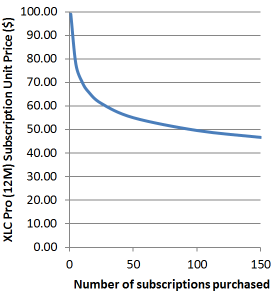
How we calculate volume discount
P = Price of single XLC Pro (12M) subscription
N = Number of XLC Pro (12M) subscriptions
r = Volume discount factor = 0.85
U = Unit Price = P x N(r – 1)
T = Total Payable = P x Nr
|
How to obtain a volume discount - Please email or telephone to discuss.
For example if you require 15 XLC Pro (12M) subscriptions:
$90.00 = Price of single XLC Pro (12M) subscription
15
= Number of XLC Pro (12M) subscriptions
0.85 = Volume discount factor = 0.85
$59.96
= Unit Price = 90 x 15(0.85 – 1)
$899.33 = Total Payable = 90 x 150.85
We will send you a PayPal invoice for $899.33. On receipt of funds ExcelCalcs will generate a Corporate Coupon which can be used 15 times. The purchaser is responsible for the distribution and use of the Corporate Coupon within his organisation. There are no time limits on the use of a Corporate Coupon.
Note: If you do not wish to pay by PayPal we will consider other methods of payment for orders over $500.
How to use your Corporate Coupon– Proceed to purchase an XLC Pro (12M) plan
using the Paypal button (but don’t worry the coupon settles the bill
before you get to Paypal). Proceed through to the ExcelCalcs checkout
page where you’ll be prompted to enter your coupon . Your XLC Pro (12M)
Corporate Coupon will totally offset the cost of the plan, you will not
proceed to PayPal and you will be immediately subscribed on the XLC Pro
(12M) Plan.
|
What We Offer Our Corporate Clients - We give live presentations online to any potential corporate customers (using Microsoft SharedView and a Windows Live™ ID).
Microsoft SharedView allows a group of people at a number of remote
locations to share applications and talk via Windows Live Messenger or
Skype.
Live demos are a great way to clear up any misunderstandings and
quickens the process of bringing ExcelCalcs and its productivity
benefits into your corporation. Some frequently asked questions are:
- Are we tied in to ExcelCalcs forever? - No
calculations made with XLC are in a native Excel file format, equtions
are simply graphics. If XLC is removed from computers only the ability
to re-render equations is lost (along with the XLC toolbar).
- What Productivity Benefits Can we Expect? Our User Survey shows that productivity benefits from ExcelCalcs save an average user 23% of their working day. The longer you spend doing calculations the more time you save; so the top 16% of users save over 45% of their working day. ExcelCalcs offers a significant cost reduction compared to traditional solutions like Mathcad and Mathematica and it works directly with Excel which everyone has, everyone knows and everyone can read. The majority of ExcelCalcs users are American engineers who earn an average salary of $72,200. Thus the average saving per ExcelCalcs user is $16,750.
- Do you offer training? Yes - and clients who purchase training can offset 20% of the training cost against XLC Pro subscription costs. Select your own training modules to suit your organisation.
- Can you prepare calculations for us? - Yes
we have prepared calculation templates for many clients and we offer
engineering analysis services beyond Excel. Our main business is engineering consultancy
we offer ANSYS finite element analysis and strain gauge test services.
We have worked on many diverse projects since starting in 1995 and our
clients include Bombardier (railway vehicles), Disney (theme
parks), Volvo (construction equipment) and Exxon (LNG tanks and subsea
equipment).
Call or email to arrange your own presentation and group discussion.
|
Please sign in or register to add a comment.