
Shaft Impact Calculation

Description
Purpose of calculation
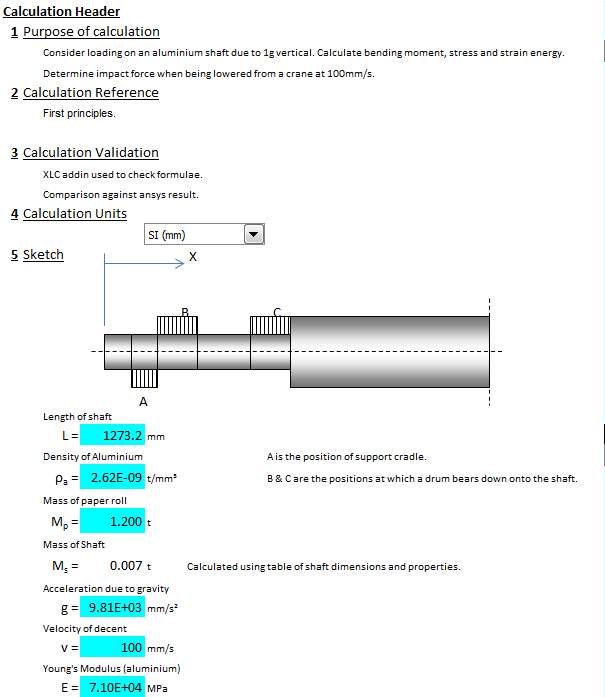
Consider loading on an aluminium shaft due to 1g vertical. Calculate bending moment, stress and strain energy.
Determine impact force when being lowered from a crane at 100mm/s.
Calculation Reference
First principles.
Calculation Validation
XLC addin used to check formulae.
Comparison against ansys result.
Procedure
Input:
Length of shaft
Density of Aluminium
Mass of paper roll
Mass of Shaft
Acceleration due to gravity
Velocity of decent
Young's Modulus (aluminium)
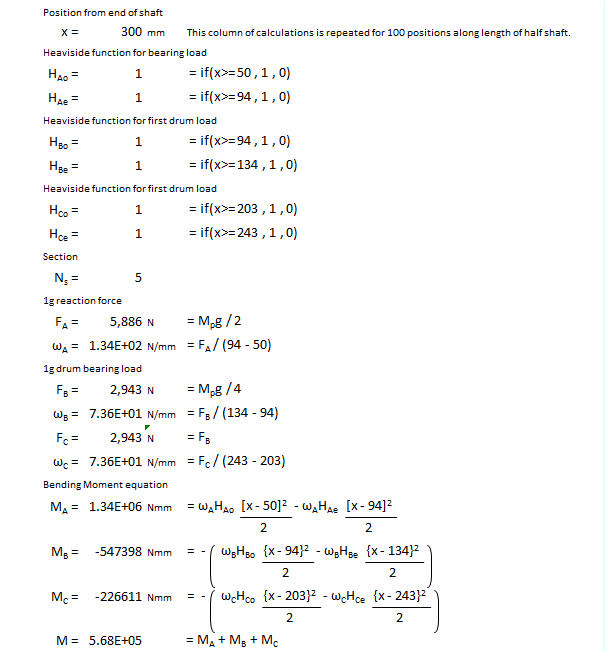
Position from end of shaft
Calculate
Heaviside function for bearing load
Heaviside function for first drum load
Heaviside function for first drum load
1g reaction force
1g drum bearing load
Bending Moment equation
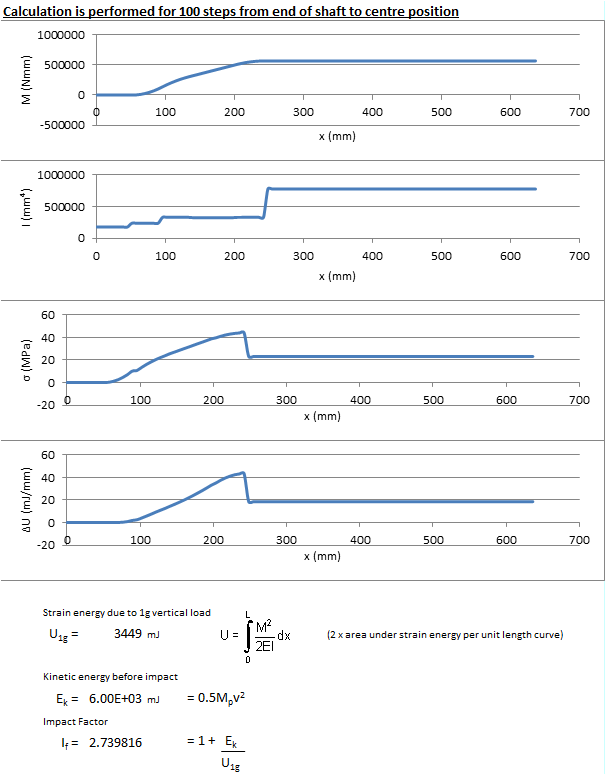
Calculation is performed for 100 steps from end of shaft to centre position
Strain energy due to 1g vertical load
Kinetic energy before impact
Impact Factor
Plot
Bending Moment
Section Properties
Stress
Strain Energy
Calculation Reference
Analysis of Impact
Shock and Vibration
Dynamic Analysis
To calculate the impact on a bar being lowered onto two supports at speed, we need to consider the energy transferred during the impact and the deceleration of the bar as it comes to rest on the supports.
Assumptions:
- The bar is uniform and has a constant cross-sectional area along its length.
- The impact occurs over a very short time and can be considered instantaneous.
- The bar comes to a complete stop after the impact.
- Ignore the effects of air resistance and other dissipative forces.
Given these assumptions, we can calculate the impact using the following steps:
- Determine the initial kinetic energy of the bar just before impact: KE_initial = (1/2) * m * v^2
where:
- m is the mass of the bar
- v is the initial speed of the bar just before impact
- Calculate the potential energy of the bar as it comes to rest on the supports: PE_final = m * g * h
where:
- g is the acceleration due to gravity (approximately 9.81 m/s^2)
- h is the vertical distance the bar's center of mass is lowered during the impact
- Calculate the change in energy during the impact: ΔE = KE_initial - PE_final
This energy change is primarily absorbed by the bar and the supports during the impact. The energy may be transferred into various forms, such as elastic deformation of the bar and supports, or dissipation through friction and sound.
- Determine the average impact force: To calculate the average impact force, we can use the work-energy principle, which states that the work done by the force is equal to the change in energy:
W = ΔE
The work done by the impact force can be calculated as:
W = F_avg * d
where:
- F_avg is the average impact force
- d is the deformation or displacement of the bar and supports during the impact
Now, equate the work-energy equation with the work done by the impact force:
F_avg * d = ΔE
Solve for the average impact force:
F_avg = ΔE / d
Keep in mind that this calculation provides an estimate of the average impact force, assuming instantaneous impact and uniform deceleration. In reality, the impact may not be perfectly uniform, and additional factors such as material properties and the specific geometry of the bar and supports can affect the actual impact force experienced.
Calculation Preview
Full download access to any calculation is available to users with a paid or awarded subscription (XLC Pro).
Subscriptions are free to contributors to the site, alternatively they can be purchased.
Click here for information on subscriptions.