Advertisement

Member Login

Contact Us
telephone US +1 617 5008224
telephone EU +44 113 8152220
telephone Toll Free: Skype
post/email Forum or Email
Like this Page?


Follow Us
Follow us on twitter. Follow us on LinkedIn. Follow us on YouTube.
Our Feeds
Repository RSS. Forum RSS. User Comment RSS. News RSS.

Who's Online

We have 20 guests and 42 members online

Total Downloads

206625


Enter Amount:


Signup Now! Subscribe, login and start downloading. Latest Calculations! Follow us on Twitter.

BTH pinned plate
 

This Excel calculation can be downloaded by ExcelCalcs subscribers.Please login or Subscribe.

Description:

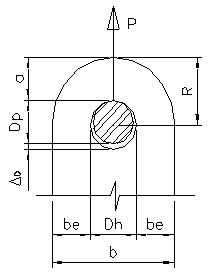
This is an example of how to produce design calculations for a pinned connection using Excel with the XLC add-in.
Design a Plate Lifting Beam and rigging plates to lift a 98 ft, 30" square PSC pile from the pile head using an embedded 2" ID PVC sleeve thru the pile width. The lifter will be capable of crane hook access and transfer the pile load from the lifting pin to the hook by means of independent eyebars from the pin to the plate spreader beam, shackles and a plate lifting beam connected to the hook.
The strength of a pin-connected plate in the region of the pinhole shall be taken as the least value of the tensile strength of the effective area on a plane through the center of the pinhole perpendicular to the line of action of the applied load (Pt), the fracture strength beyond the pinhole on a single plane parallel to the line of action of the applied load (Pb), and the double plan shear strength beyond the pinhole parallel to the line of action of the applied load (Pv).

Related Calculations at ExcelCalcs
Clevis and lug design V0001.xls
S-hook design V0001.xls
Padeye.xls
Aerospace_lug_analysis.xls
Pin and Lug.xls
Pin and Lug - Static and Fatigue.xls

Calculation Reference
Design of pinned connections
| Find on Amazon.com | Find on Amazon.co.uk | Find on Amazon.fr | Find on Amazon.de | Find on Amazon.ca |
Steel Structures
| Find on Amazon.com | Find on Amazon.co.uk | Find on Amazon.fr | Find on Amazon.de | Find on Amazon.ca |


Version History
Subscribe to this topic and get notified by mail about new posts Favorite to this topic Discuss this item in the forum. Check the version history to see how this calculation has changed over time. Use the Subscribe button to receive an automatic email should this calculation be updated to a higher version. Use the Favourite button so you can easily find this calculation in the future.

Submitted On:
18 Jun 2012
Submitted By:
m4grem
File Date:
04 Sep 2009
File Author:
Martin Grem
File Version:
1.0
File Size:
236.00 Kb
File Type:
xls
XLC:
This download requires the XLC Add-in for Excel to be installed.
Downloads:
852
Rating:
stars/4.gifTotal Votes:5
HTML Link:
Copy code below to your web page to create link to this page:
HTML Window:
Copy code below to your web page to create a dynamic window to this download:
Like This?:
View the profile of the person who submitted this calculation and see all their other calculations hosted at ExcelCalcs.
Need Help?:
Use the comment feature below to raise any questions relating to this download. The question will be automatically emailed the author and all users subscribing to this comment thread.

Comments  

 
#7 Boss Ed 2012-01-23 09:10
Thanks John,
I have double checked and the issue is applicable to the BTH pinned download as well as the sample xls file supplied and the Trajectories download file....

The freezing issue assocaited with the toggle switch etc

So guess you are right I will uninstall and reinstall....
 
 
#6 JohnDoyle 2012-01-23 08:04
It sounds like the XLC addin is not installed correctly (see FAQ's). I should try to uninstall and re-install. I am happy to help via the forum should you have any further difficulties.
 
 
#5 Boss Ed 2012-01-23 07:58
guys why on the downloads am I getting #name in fields in the downloads... also the addin refresh tool is freezing the spreadsheet... I am using excel 2010... windows 7.. Have already addin the xlc.dll
 
 
#4 bhushankulkar 2011-12-26 15:17
nice one
 
 
#3 awenn 2011-06-23 13:45
good thankyou!
 

Please sign in or register to add a comment.

Training Courses For London Underground

"Thanks again for your excellent course this past week." "Thank you for the course last week, found it very interesting both from the perspective of a quick refresh, but also on how we can optimise the work we do." "Thanks for a very interesting and usef...

Try Excel 2013 for Free!

I am pleased to report that XLC Ribbon works with the 32bit and 64 bit versions of Excel 2013 obtained using the free Office 365 Home Premium Preview. Excel 2013 looks a little flat and dull compared to previous versions but I think this is the influence of the new Windows 8 'metro' look and f...

Introducing XLC the Ribbon Version

New!XLC Ribbon    For the first time XLC works with both 32 bit and 64 bit versions of Excel with an enhanced Office Ribbon display. It is a much simpler installation process than the previous Toolbar versions so you can be up and running in no time at all. ...

ExcelCalcs Bites the Bullet!

Hitachi have recently been awarded the largest ever UK rolling stock order and they’ll be bringing their Shinkansen bullet train technology to Europe. In August ExcelCalcs braved the stifling Japanese heat to deliver their ‘Fatigue of Welded Structures’ course to Hitachi b...

Engineer's Excel!

Our XLC software is a mathematical add-in for Excel. Generating equations direct from cell formulas it is an essential verification tool for engineers. Furthermore the ExcelCalcs community is the world’s most active producer of Excel solutions to engineering problems. The table below shows w...

ExcelCalcs Lego-Like Way to Engineering

Like a child selecting parts to construct a Lego model engineers bring together blocks of science to create new designs. These building blocks could be a load calculation, a beam calculation, a weld calculation, a fatigue calculation or any other calculation from a myriad of engineering topics. As...

iPhone, Android and Mobile Device Access

The site is optimised for browsing on mobile devices like the iPhone or Android phones. To create a web app icon browse to http://www.excelcalcs.com/navigate/ and ‘Add to Home Screen’. You will find an icon much like an app icon on your home screen which will bring you straight back...

ExcelCalcs Trailblazers

I have been chasing up feedback from new users signing up to XLC Pro accounts in the last month. I am delighted with their positive feedback. “I started using XLC but I am now insisting that my whole team use the add-in .“ “It is a great tool for validation and pres...

Increasing Engineering Confidence

Engineering training - “I run a team of engineers and whilst there are plenty of soft options for training expounding the latest management techniques there is precious little to develop the engineering skills of my team”. This is a familiar story we hear from clients of our trai...