Advertisement

Member Login

Like this Page?


Follow Us
Follow us on twitter. Follow us on LinkedIn. Follow us on YouTube.
Our Feeds
Repository RSS. Forum RSS. User Comment RSS. News RSS.
Contact Us
post/email Forum or Email
telephone US +1 617 5008224
telephone EU +44 113 8152220
telephone Toll Free: Skype
Live Chat Live Chat

Who's Online

We have 43 guests and 45 members online

Total Downloads

182681


Enter Amount:


Signup Now! Subscribe, login and start downloading. Latest Calculations! Follow us on Twitter.

ExcelCalcs Lego-Like Way to Engineering

Like a child selecting parts to construct a Lego model engineers bring together blocks of science to create new designs. These building blocks could be a load calculation, a beam calculation, a weld calculation, a fatigue calculation or any other calculation from a myriad of engineering topics. As...

iPhone, Android and Mobile Device Access

The site is optimised for browsing on mobile devices like the iPhone or Android phones. To create a web app icon browse to http://www.excelcalcs.com/navigate/ and ‘Add to Home Screen’. You will find an icon much like an app icon on your home screen which will bring you straight back...

ExcelCalcs Trailblazers

I have been chasing up feedback from new users signing up to XLC Pro accounts in the last month. I am delighted with their positive feedback. “I started using XLC but I am now insisting that my whole team use the add-in .“ “It is a great tool for validation and pres...

Increasing Engineering Confidence

Engineering training - “I run a team of engineers and whilst there are plenty of soft options for training expounding the latest management techniques there is precious little to develop the engineering skills of my team”. This is a familiar story we hear from clients of our trai...

Join our Corporate Partners Scheme

You are probably familiar with our tools of mass knowledge distribution on our website but ExcelCalcs also works more closely with corporate partners providing engineering training and engineering consultancy services. What’s more these services and ExcelCalcs subscriptions are availa...

Introducing ExcelCalcs eFormulas

ExcelCalcs eFormulas aims to replace traditional engineering formula books providing innovative functionality to copy from our webpages and paste directly into Excel. Once in Excel it is easily edited to suit your own problems this functionality is far more flexible than 'stuck on the web'&n...

Deciphering Spreadsheets with XLC

At some time or other you will have been given someone else’s spreadsheet only to be left scratching your head not having a clue as to what the calculation is doing.  If you are wise you will not use it because you can’t understand it. If you are wiser still you’ll use our...

Make Amazing Calculations

In our good calculation guide we emphasise the importance of sketches in calculations but you can produce interactive 3D wireframe sketches by incorporating Turan Babacan’s latest upload. Turan uses 3D charts to great effect in his Excel FEM programs. Andy Pope also has a 3D chart spr...

Coming Soon XLC Ribbon

A new version of XLC is in the final stages of development which will be compatible with the 64 bit version of Excel 2010 (currently it works with the 32 bit version of Excel 2010, 2007 2003 and 2000). We’ll keep you posted with progress. Please send us details of any features you ...

Lifting lug calcs.xls
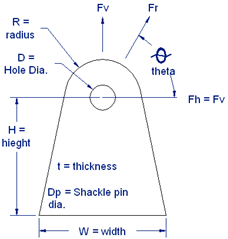
 

This Excel calculation can be downloaded by ExcelCalcs subscribers.Please login or Subscribe.

Description:

Check lug shear stress.

Check Bending and tension stress.

Check bearing stress.

Check weld size.

Calculation Reference
Machine Design
| Find on Amazon.com | Find on Amazon.co.uk | Find on Amazon.fr | Find on Amazon.de | Find on Amazon.ca |
Strength of Welds
| Find on Amazon.com | Find on Amazon.co.uk | Find on Amazon.fr | Find on Amazon.de | Find on Amazon.ca |
Design of Lifting Equipment
| Find on Amazon.com | Find on Amazon.co.uk | Find on Amazon.fr | Find on Amazon.de | Find on Amazon.ca |

Version History
Subscribe to this topic and get notified by mail about new posts Favorite to this topic Discuss this item in the forum. Check the version history to see how this calculation has changed over time. Use the Subscribe button to receive an automatic email should this calculation be updated to a higher version. Use the Favourite button so you can easily find this calculation in the future.

Submitted On:
21 Mar 2011
Submitted By:
shaberli
File Date:
21 Mar 2011
File Author:
Steve Haberli
File Version:
1.0
File Size:
39.50 Kb
File Type:
xls
Downloads:
196
Rating:
stars/3.gifTotal Votes:7
Like this?:
More submitted by this user.
HTML Link:
Copy code below to your web page to create link to this page:
HTML Window:
Copy code below to your web page to create a dynamic window to this download:

Comments  

 
#9 cstrain 2012-02-23 20:24
I don't know if it is addressed in this thread, but G16 has an error in it regarding the calculation of the horizontal component of the load based on theta. I believe the equation should be G18*cos(G17*PI()/180)
 
 
#8 JohnDoyle 2011-12-23 10:05
I am sorry pgrahn I thought it was a question only relating to cell D59 regarding the combined stress but I now realise the question relates to cell D31 and I must say I am a little perplexed too. The first two terms seem fine but I am not at all sure what the third term in the equation is doing. To my mind there seems to be confusion between the resultant force Fr and vertical and horizontal components Fv and Fh. I hope that the author shaberli can shed some light on the calculation but I would be extremely cautious about its use in my own calculations. There are many other lug calculations on the site with good ratings and feedback perhaps you should take a look to them?
 
 
#7 pgrahn 2011-12-21 16:25
Quoting JohnDoyle:
The formula for combined stress seems to be an approximation for either the maximum principle stress or twice the maximum shear stress. Both of which are used for failure criterion. I do not think it is a mistake. You could study further using Biaxial Stress Assessment.xls. A set of brackets is redundant in the formula but this matters little to the result. It will be interesting to see calculation author's comments.


The equation seems appropriate. My concern is the coding in the excell spreadsheet in which leaving out the parenthesis makes a significant difference.
Without the parenthesis in the denominator the numerator is only divided by "W" and not "(W*(t^2/6)).

The author may have multiplied t instead of squared t as well.
 
 
#6 JohnDoyle 2011-12-21 07:45
The formula for combined stress seems to be an approximation for either the maximum principle stress or twice the maximum shear stress. Both of which are used for failure criterion. I do not think it is a mistake. You could study further using Biaxial Stress Assessment.xls. A set of brackets is redundant in the formula but this matters little to the result. It will be interesting to see calculation author's comments.
 
 
#5 pgrahn 2011-12-21 00:04
I have a question/concern about calculating the Bending + Tension Stress (Longitudinal)e quation.

In the denominator of the last equation it has "(W*(t2/6)"...

Is that t^2 or t*2?
Also in the excell equation is leaves out a set of parenthesis.

These two possible errors results in dramatic changes in the equation.
 
 
#4 lhee 2011-10-19 04:29
tnank you
 
 
#3 JohnDoyle 2011-08-13 11:09
Hi I am an ExcelCalcs website administrator. Could you explain the problem you are having and I can try to help you. What are you trying to do?

barangeravindra emailed saying:
Quote:
I would like to ask you how lifting lug can check under following conditions. 1) Double shear of lug because of vertical componant 2) calculation for bearing stress at pinhole. 3) Bending stress because of horizontal componant of loading 4) Tensile stress at weld between lug and vessel 5) combined stress (Bending and shear) I am farwording herewith design calculation of the lifting lug For your ready reference. You are requested to incoparte the above calculations in the same if possible. Thanking you.


We try to help as best we can but we simply do not have enough time to answer such detailed questions from free subscribers. However our calculations previews in this folder show the equations you are looking for. Please feel free to copy the formulas into your own spreadsheet.
 
 
#2 barangeravindra@rediffmai 2011-08-13 10:59
Taken from the ExcelCalcs.com website.This option will not work correctly. Unfortunately, your browser does not support Inline Frames
 
 
#1 djking3 2011-04-18 02:35
thanks alot!!!
 

Please sign in or register to add a comment.