Advertisement

Member Login

Like this Page?


Follow Us
Follow us on twitter. Follow us on LinkedIn. Follow us on YouTube.
Our Feeds
Repository RSS. Forum RSS. User Comment RSS. News RSS.
Contact Us
post/email Forum or Email
telephone US +1 617 5008224
telephone EU +44 113 8152220
telephone Toll Free: Skype
Live Chat Live Chat

Who's Online

We have 43 guests and 36 members online

Total Downloads

177544


Enter Amount:


Signup Now! Subscribe, login and start downloading. Latest Calculations! Follow us on Twitter.

BEAMCOL9.xls
 

This Excel calculation can be downloaded by ExcelCalcs subscribers.Please login or Subscribe.

Description:

"BEAMCOL9" is a spreadsheet program written in MS-Excel for the purpose of analysis and code checking of steel beams and columns.  Specifically, beams and columns are analyzed / code checked per the AISC 9th Edition Allowable Stress Design (ASD) Manual.  Both actual and allowable stresses are computed, with the final result being a computed "stress ratio" of actual stress/allowable stress.  Also, a list of the lightest weight members which satisfy the code check is displayed for convenience.

This program is a workbook consisting of six (6) worksheets, described as follows:
  • Doc - Documentation sheet
  • BeamCol(I) - Analysis / Code Check for W, S, M, and HP Shapes
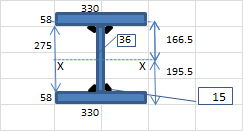
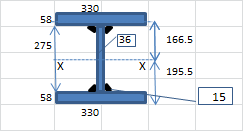
  • BeamCol(Built-Up) - Analysis / Code Check for Non-Database and Built-Up Shapes
  • BeamCol(C) - Analysis / Code Check for Channel Shapes
  • BeamCol(Tube) - Analysis / Code Check for Rectangular HSS (Tube) Shapes
  • BeamCol(Pipe) - Analysis / Code Check for Round HSS and Pipe Shapes
All the worksheets are independent and self contained, so that you can move them from one workbook to another. All the worksheets are protected, but not with a password.

Program Assumptions and Limitations:

1.   This program follows the procedures and guidelines of the AISC 9th Edition Allowable Stress (ASD) Manual (1989).

2.   This program uses the database of member dimensions and section properties from the "AISC Shapes Database", Version 3.0 (2001) as well as the AISC 9th Edition (ASD) Manual (1989).

3.   The "BeamCol(Built-Up)" worksheet is valid for AISC W, S, M, and HP shapes NOT contained in the AISC 9th Edition Manual, as well as for non-hybird and doubly-symmetrical ("I" shaped) built-up members which have their flanges continuously welded to the web and which DO NOT quailify as plate girders.(Note: the AISC Code limiting value on the web for built-up beams not to qualify as plate girders is as follows:
     (d-2*tf)/tw <= 760/SQRT(0.60*Fy)

4.   This program is NOT valid for tees (WT shapes) and angles.

5.   In this program for members subjected to known loadings consisting of axial load (compression or tension) and/or uniaxial or biaxial bending, both the actual and allowable stress are computed, with the final result being a computed "stress ratio" of actual stress/allowable stress.

6.   The "BeamCol(Built-Up)" worksheet will require the input for the total depth, web thickness, flange width, and flange thickness.  Then, all the remaining section properties are automatically calculated, assuming straight,non-sloping flanges.

7.  This program utilizes an "Allowable Stress Increase Factor" (ASIF) which is a multiplier of any of the calculated allowable stresses Fa, Fbx, and Fby and also the Euler column buckling stresses F'ex and F'ey. It is used and appears ONLY in the stress ratio calculation.  Typically a value of 1.0 may be used.  However, a value of 1.333 may be used for load combinations which include wind or seismic loads.

8.  If an axially loaded compression member has a value of the maximum slenderness ratio K*L*12/r >200, then a message will appear.  However, this program DOES NOT consider or deem a particular member as "inadequate" based on the slenderness ratio of 200 being exceeded.

9.  For the case of combined axial compression with bending, if the calculated value of fa >=F'e (which is not allowed) then a warning (error!) message will appear.

10. When the values of either 'Lx', 'Ly', or 'Lb' are input = 0' (or actually <= 1.0'), this program will use a value = 1.0'.

11. When a stiffened element (web) of a member subjected to axial compression is classified as a "slender" element (exceeding non-compact limits) based on local buckling criteria, then the program complies with AISC Appendix B.

12. In the "BeamCol(C)" worksheet for channels subjected to Y-axis bending, the properties database uses the minimum value of 'Sy'.  However, it is desired to calculate the bending stress at the back of the channel instead of at the tips of the flanges, this may be done by computing a "reduced effective" Y-axis bending moment,  Mye = My*Sy*(xbar)/Iy , for member loading input.

13. The values of 'Cb', 'Cmx', 'Cmy', 'Kx, and 'Ky' may be calculated (if applicable) by accessing the additional input data to the right of the main page in each of the calculation worksheets.  Then, these calculated values can be input under the member design parameters on the main page.  (Note: there are equations which very closely approximate the solutions for 'Kx' and 'Ky' obtained using the AISC Code Alignment Charts.)

14. This program does not calculate or check shear or deflection in member

15. This program does not consider torsion on member.

16. This program does not consider deduction for holes in members subjected to tension.

17. This program contains numerous “comment boxes” which contain a wide variety of information including explanations of input or output items, equations used, data tables, etc.  (Note:  presence of a “comment box” is denoted by a “red triangle” in the upper right-hand corner of a cell.  Merely move the mouse pointer to the desired cell to view the contents of that particular "comment box".)

Calculation Reference
AISC
| Find on Amazon.com | Find on Amazon.co.uk | Find on Amazon.fr | Find on Amazon.de | Find on Amazon.ca |

Version History
Subscribe to this topic and get notified by mail about new posts Favorite to this topic Discuss this item in the forum. Check the version history to see how this calculation has changed over time. Use the Subscribe button to receive an automatic email should this calculation be updated to a higher version. Use the Favourite button so you can easily find this calculation in the future.

Submitted On:
04 Dec 2008
Submitted By:
ATomanovich
File Date:
04 Dec 2008
File Author:
Alex Tomanovich
File Version:
3.5
File Size:
864.50 Kb
File Type:
xls
Downloads:
766
Rating:
stars/4.gifTotal Votes:14
Like this?:
More submitted by this user.
HTML Link:
Copy code below to your web page to create link to this page:
HTML Window:
Copy code below to your web page to create a dynamic window to this download:

Comments  

 
#6 hienngocloveyou 2011-06-18 17:00
After I used, benefited, and enjoyed your spreadsheets, finally I found the time to say, Thank you.
 
 
#5 JohnDoyle 2010-09-27 07:56
You need an XLC Pro subscription to download from the repository. This can paid for or awarded for free if you donate a calculation to the site. It is all explained on the subscription plans page.
 
 
#4 Abuawais 2010-09-26 07:20
How can these file be downloaded?
 
 
#3 brucewils 2009-10-27 23:44
good
 
 
#2 trungnm 2008-11-26 09:39
Thank you very much !
 
 
#1 MSH 2008-09-09 16:09
After I used, benefited, and enjoyed your spreadsheets, finally I found the time to say, Thank you.
 

Please sign in or register to add a comment.

ExcelCalcs Trailblazers

I have been chasing up feedback from new users signing up to XLC Pro accounts in the last month. I am delighted with their positive feedback. “I started using XLC but I am now insisting that my whole team use the add-in .“ “It is a great tool for validation and pres...

Increasing Engineering Confidence

Engineering training - “I run a team of engineers and whilst there are plenty of soft options for training expounding the latest management techniques there is precious little to develop the engineering skills of my team”. This is a familiar story we hear from clients of our trai...

Join our Corporate Partners Scheme

You are probably familiar with our tools of mass knowledge distribution on our website but ExcelCalcs also works more closely with corporate partners providing engineering training and engineering consultancy services. What’s more these services and ExcelCalcs subscriptions are availa...

Introducing ExcelCalcs eFormulas

ExcelCalcs eFormulas aims to replace traditional engineering formula books providing innovative functionality to copy from our webpages and paste directly into Excel. Once in Excel it is easily edited to suit your own problems this functionality is far more flexible than 'stuck on the web'&n...

Deciphering Spreadsheets with XLC

At some time or other you will have been given someone else’s spreadsheet only to be left scratching your head not having a clue as to what the calculation is doing.  If you are wise you will not use it because you can’t understand it. If you are wiser still you’ll use our...

Make Amazing Calculations

In our good calculation guide we emphasise the importance of sketches in calculations but you can produce interactive 3D wireframe sketches by incorporating Turan Babacan’s latest upload. Turan uses 3D charts to great effect in his Excel FEM programs. Andy Pope also has a 3D chart spr...

Coming Soon XLC Ribbon

A new version of XLC is in the final stages of development which will be compatible with the 64 bit version of Excel 2010 (currently it works with the 32 bit version of Excel 2010, 2007 2003 and 2000). We’ll keep you posted with progress. Please send us details of any features you ...

An Allowable Business Expense

Most ExcelCalcs users charge subscription fees back to their employers as a business expense. The cost is easily justified as membership of the site have been shown to yield a 23% productivity benefit. Many people do not realise that you don't even need a PayPal account to pay - you can pay...

Document Control at ExcelCalcs

Document control is a key issue for engineers but it can become an administrative nightmare. Here at ExcelCalcs we have developed many tools to control the calculations we distribute and as a member you have access to all these tools. Problem ExcelCalcs Document Control...