
LineSec.xls

Description
'LINESEC' - SECTION PROPERTY CALCULATION FOR SECTIONS DEFINED BY LINES
Program Description:
'LINESEC' is a spreadsheet program written in MS-Excel for the purpose of calculating the section properties of any section comprising lines.
Program Assumptions and Limitations:
1. This program will calculate the centroid location, total cross-sectional area, moments of inertia, and radii of gyration for the centroidal axes and the principal axes if applicable. The value of the rotation angle between the centroidal and principal axes is also calculated.
2. Units are any consistent set of units the user desires.
Calculation Procedure:
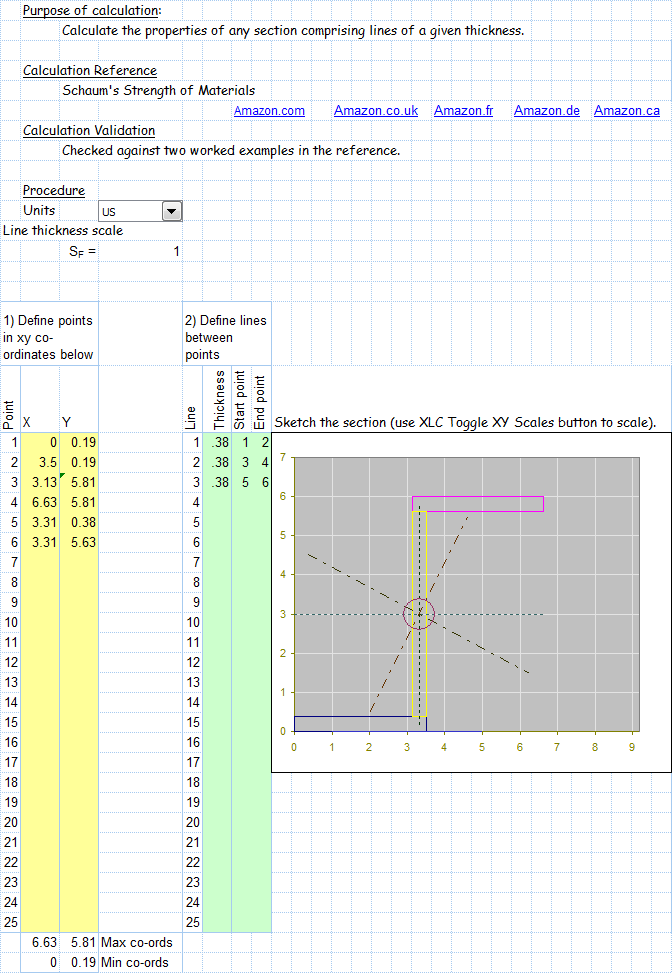
1. Use 'TabCalc' worksheet to define section. First define points in the xy co-ordinate system (up to 25 points - only update cells with yellow background). Define line thickness and start point and end point of lines (up to 25 lines possible using cells with green background).
2. Your section will be drawn at the top of 'SecCalc' worksheet. You will need to adjust the aspect ratio of the chart (height to width ratio) so that the x scale equals the y scale other wise your section will appear to be skew. You may also adjust the line thickness scale factor for clarity.
3. If your section is not symmetric you will also be able to view the principal axis of the section.
4. In the section headed 'Stress Evaluation' you can apply loads to the section and calculate the stress at any location.
5. A chart is used to show stress at corner locations of each line.
Application:
1. The workbook is useful for assessment of sections made from fabricated plates.
2. The workbook is also useful for the assessment of weld lines.
Calculation Reference
Beam calculation
Structural analysis
Calculating section properties for sections defined by lines can be done using the following steps:
-
Define the section using line coordinates: Create a list of coordinates (x, y) that define the section's geometry. Ensure that the coordinates follow a consistent order, either clockwise or counterclockwise.
-
Calculate the area (A) and centroid (C) of the section: Use the following formulae to calculate the area and centroid:
A = (1/2) * Σ[(xi * yi+1) - (xi+1 * yi)]
Cx = (1/(6*A)) * Σ[(xi + xi+1) * ((xi * yi+1) - (xi+1 * yi))]
Cy = (1/(6*A)) * Σ[(yi + yi+1) * ((xi * yi+1) - (xi+1 * yi))]
where (xi, yi) and (xi+1, yi+1) represent adjacent coordinates.
- Calculate the moments of inertia (Ix, Iy) and the product of inertia (Ixy) of the section:
Ix = (1/12) * Σ[((yi^2 + yi * yi+1 + yi+1^2) * ((xi * yi+1) - (xi+1 * yi))])
Iy = (1/12) * Σ[((xi^2 + xi * xi+1 + xi+1^2) * ((xi * yi+1) - (xi+1 * yi))])
Ixy = (1/24) * Σ[((xi * yi+1 + 2 * xi * yi + 2 * xi+1 * yi+1 + xi+1 * yi) * ((xi * yi+1) - (xi+1 * yi))])
- Calculate the radius of gyration (rx, ry) of the section:
rx = sqrt(Ix / A)
ry = sqrt(Iy / A)
By following these steps, you can calculate the section properties, including area, centroid, moments of inertia, and radii of gyration, for sections defined by lines. Note that these calculations assume that the section is a polygon with straight sides. If the section has curved sides, you may need to use numerical methods or specialized software for more accurate results.
Calculation Preview
Full download access to any calculation is available to users with a paid or awarded subscription (XLC Pro).
Subscriptions are free to contributors to the site, alternatively they can be purchased.
Click here for information on subscriptions.
Compare stress calculated using xy axis to principal axisAddition of shear stress termsCalculation of resultant shear stress which is useful for assessment of fillet weld lines.Option to plot different stress items on chart.