Anchor Reinforcement
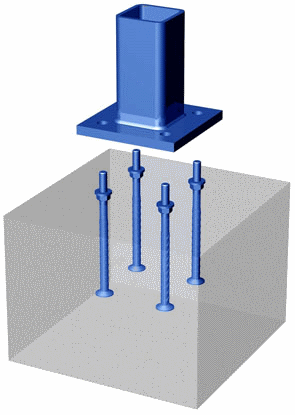
Description
"ANCHOR REINF." --- ANCHOR REINFORCEMENT ANALYSIS
Program Description:
"Anchor Reinf.xls" is a MS-Excel spreadsheet workbook for the analysis of anchor bolt reinforcement to suppliment tension/shear concrete breakout per ACI 318-08, Appendix D (Section D5.2.9 / D6.2.9). The spreadsheet is designed to find the embedment strength of determined reinforcementwithin certain concrete parameters. Tables and figures have been given adjacent to the required data cells in an attempt to self contain the calculations within the worksheet. The spreadsheet is protected but with no password required.
Program Environment:Microsoft Office Excel 2003
Creation Date:May20th, 2008
Design References:
1. ACI 318-08
2. Strength Design of Anchorage to Concrete by Ronald A. Cook
This program is a workbook consisting of three (3) worksheets, described as follows:
Worksheet NameDescription
DocThis documentation sheet
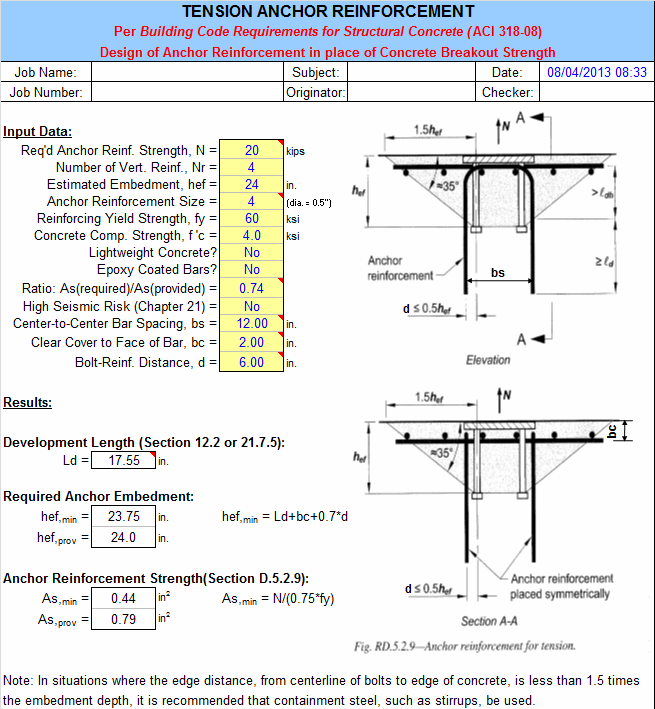
Tension Reinf.Anchor Reinforcement per ACI 318-08 Section D.5.2.9
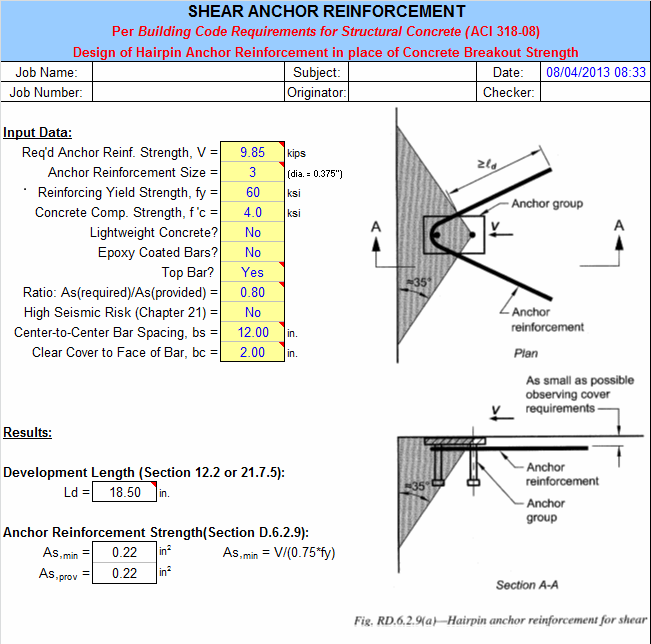
Shear Reinf.Anchor Reinforcement per ACI 318-08 Section D.6.2.9
Revision 1.0: 5/20/09 - Original Design
Program Assumptions and Limitations:
1. In TENSION REINF. spreadsheet, the edge distance is not in the program's parameters.User must be mindful that the maximum distance between the anchor and anchor reinforcement must be less than or equal to 0.5 x hefAND (ED - bc).The latter is not restricted and must be checked by the user.
2.In TENSION REINF. spreadsheet, if the edge distance is less than 1.5 x hef, containment steel such as stirrups must be used.
3. The required strength is calculated from the applicable load combinations in Section 9.2.
4.This program contains numerous “comment boxes” which contain a wide variety of information including explanations of input or output items, equations used, data tables, etc.(Note:presence of a “comment box” is denoted by a “red triangle” in the upper right-hand corner of a cell.Merely move the mouse pointer to the desired cell to view the contents of that particular "comment box".)
Program Theory and Operation:The top of the spreadsheet screen allows for input of required information in lightly yellow highlighted boxes. Information required includes the following:
TENSION REINF. Spreadsheet:
Input:
1. Req'd Anchor Reinf. Strength, N: The required anchor reinforcement strength must be equal or larger than the anchor bolt steel strength, ΦNsa, if anchor design includes earthquake forces for structures assigned with Seismic Design Category is C,D,E, or F.(ACI Section D3.3)
2. Number of Vert. Reinf., Nr: Number of vertical steel reinforcement bars to resist vertical forces.
3. Estimated Embedment, hef: User's current embedment design of anchor bolts (w/o tension breakout strength per ACI 318-08 Section D.5.2)
4. Anchor Reinforcement Size: Size of steel rebar from #3 to #14.
5. Reinforcing Yield Strength, fy: in units of ksi
6. Concrete Comp. Strength, f 'c: in units of ksi
7. Lightweight Concrete: If the concrete is lightweight, then "Yes".
8. Epoxy Coated Bars: If bars are epoxy coated, then "Yes".
9. Ratio: As(required)/As(provided): Per Section 12.2.5, the development length may be shortened if the ratio is less than one.(N/A for Chapter 21 design)
10. Seismic Design per Chapter 21: If anchors are located in structure assigned to Seismic Design Category C, D, E, or F. (Sect. D3.3), then "Yes".
11. Center-to-Center Bar Spacing, bs: The minimum center-to-center bar spacing between parallel bars in a layer MUST BE >= 2*dband >= 1".For walls and slabs, maximum center-to-center bar spacing MUST BE <= 3*wall or slab thicknessand<= 18".
12. Clear Cover to Face of Bar, bc: Minimum clear cover per Section 7.7.
13. Bolt-Reinf. Distance, d: The bolt-reinforcement distance should be the less than or equal to the maximum (edge distance - bc) and 0.5hef.
Output:
1. Required Development Length, Ld:
Ld = ((fy*1000)/(f'c*1000)^(1/2)*yt*ye/(l*20))*db*As/As(prov) (Section 12.2.2)
Ld = Maximum of: 3.25*(fy*1000)*db/(65*(f'c*1000)^(1/2))*ye, 8*db, or 6"(Section 21.7.5)
2. Required Embedment Length:
hef,min = Ld+bc+0.7*d
hef,prov = per embedment entered (See input #3)
3. Required Anchor Reinforcement Size:
As,min = N/(0.75*fy)(Section D.5.2.9)
As,prov = per size and number entered (See input #2 & 4)
SHEAR REINF. Spreadsheet:
Input:
1. Req'd Anchor Reinf. Strength, V: The required anchor reinforcement strength must be equal or larger than the anchor bolt steel strength,ΦVsa, if anchor design includes earthquake forces for structures assigned with Seismic Design Category is C,D,E, or F. (ACI Section D3.3)
2. Anchor Reinforcement Size: Size of steel rebar from #3 to #14.
3. Reinforcing Yield Strength, fy: in units of ksi
4. Concrete Comp. Strength, f 'c: in units of ksi
5. Lightweight Concrete: Enter whether the concrete is lightweight or normal weight concrete.
6. Lightweight Concrete: If the concrete is lightweight, then "Yes".
7. Epoxy Coated Bars: If bars are epoxy coated, then "Yes".
development length, then "Yes"(Section 12.2.4(a))
8. Ratio: As(required)/As(provided): Per Section 12.2.5, the development length may be shortened if the ratio is less than one.(N/A for Chapter 21 design)
9. Seismic Design per Chapter 21: If anchors are located in structure assigned to Seismic Design Category C, D, E, or F. (Sect. D3.3), then "Yes".
10. Center-to-Center Bar Spacing, bs: The minimum center-to-center bar spacing between parallel bars in a layer MUST BE >= 2*dband >= 1".For walls and slabs, maximum center-to-center bar spacing MUST BE <= 3*wall or slab thicknessand<= 18".
11. Clear Cover to Face of Bar, bc: Minimum clear cover per Section 7.7.
Output:
1. Required Development Length, Ld:
Ld = ((fy*1000)/(f'c*1000)^(1/2)*yt*ye/(l*20))*db*As/As(prov)(Section 12.2.2)
Ld = Maximum of: 3.25*(fy*1000)*db/(65*(f'c*1000)^(1/2))*ye, 8*db, or 6" (Section 21.7.5)
2. Required Anchor Reinforcement Size:
As,min = V/(0.75*fy) (Section D.5.2.9)
As,prov = per size and number entered (See input #2 & 4)
Calculation Reference
ACI 318-08
anchor bolt
Calculation Preview
Full download access to any calculation is available to users with a paid or awarded subscription (XLC Pro).
Subscriptions are free to contributors to the site, alternatively they can be purchased.
Click here for information on subscriptions.


![avatar JohnDoyle[Admin]](/media/com_osmembership/avatars/62_56e81868b9b33.png)