
xlsudoku.xls
 (5/10)
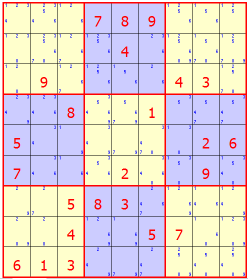
Description
XLSudoku – Sudoku Puzzle Game for Excel
A Sudoku game played in an Excel worksheet. It is not an engineering calculation: it generates or loads 9×9 Sudoku puzzles, shows the candidate digits still possible in every empty cell, and can give hints or solve the puzzle outright.
How it works
Around each square of the grid, worksheet formulas display the digits 1 to 9 that are not yet used in that square’s row, column or 3×3 box, so the “pencil marks” update automatically as you play. Each square has a drop-down list that offers only those remaining candidates, which prevents most illegal entries. A counter shows how many squares are filled.
Controls
- Generate Puzzle – creates a new puzzle
- Database Puzzle – loads a stored puzzle by number and level (Easy, Medium or Hard) from the Database sheet
- Hint – fills in a helpful square when you are stuck
- Solve Puzzle – completes the grid, with an optional animation
- Clear – empties the grid
The workbook is saved with puzzle 15 (Hard) in progress, 24 squares filled.
Please note
- The buttons run VBA macros, so macros must be enabled for them to work; the candidate display and drop-down lists are ordinary formulas and data validation and work without macros.
- The game sheet is protected; you can add your own puzzles to the Database sheet following the layout rule written at its top (each entry 12 rows below the previous one).
- Not all three difficulty levels are equally stocked in the stored database; Generate Puzzle is the main source of new games.
Calculation Preview
(5/10)
Full download access to any calculation is available to users with a paid or awarded subscription (XLC Pro).
Subscriptions are free to contributors to the site, alternatively they can be purchased.
Click here for information on subscriptions.
Be the first to comment! Please sign in or register.
×