
BEAMCOL9.xls
 (4/43)
Description
Steel Beam-Column Stress Check to AISC 9th Edition ASD
Checks steel members under axial compression or tension combined with bending about one or both axes, to the AISC 9th Edition allowable stress method. It computes the actual and allowable stresses, the combined stress ratio, and lists the lightest sections that pass.
Sheets
- BeamCol(I) – W, S, M and HP shapes from the built-in AISC database
- BeamCol(Built-Up) – doubly symmetric I-sections not in the database, from depth, web and flange dimensions (not plate girders)
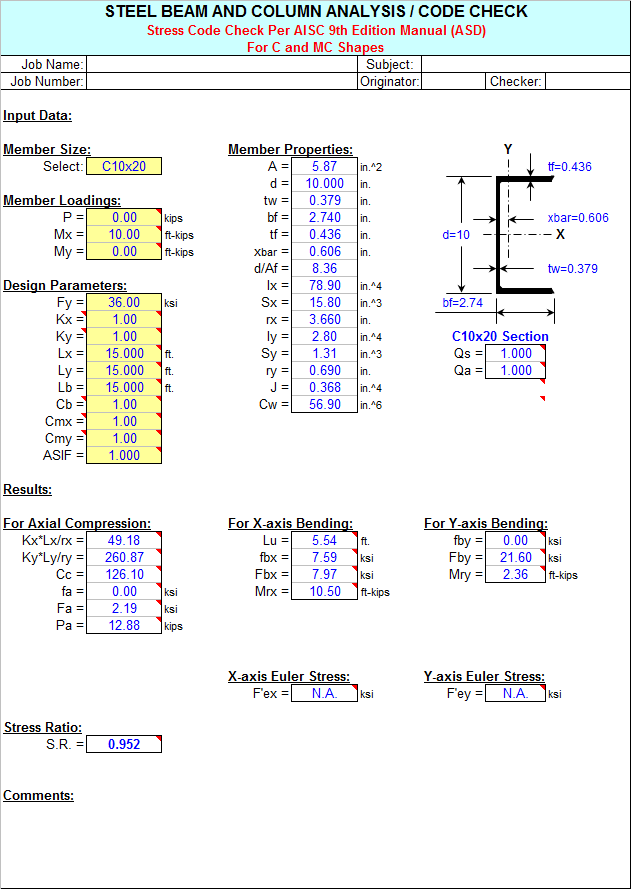
- BeamCol(C), BeamCol(Tube) and BeamCol(Pipe) – channels, rectangular HSS and round HSS or pipe
Method
- Allowable axial stress Fa from Chapter E (column curve with Cc), separately for each axis
- Allowable bending stresses from Chapter F, including lateral-torsional buckling with Cb and compactness
- Interaction to Chapter H: H1-3 when fa/Fa ≤ 0.15, otherwise H1-1 and H1-2 with Cm and the Euler stresses
Inputs
- Section, axial load, Mx and My
- Fy, effective length factors and unbraced lengths about each axis and for bending, Cb, Cmx, Cmy
Outputs
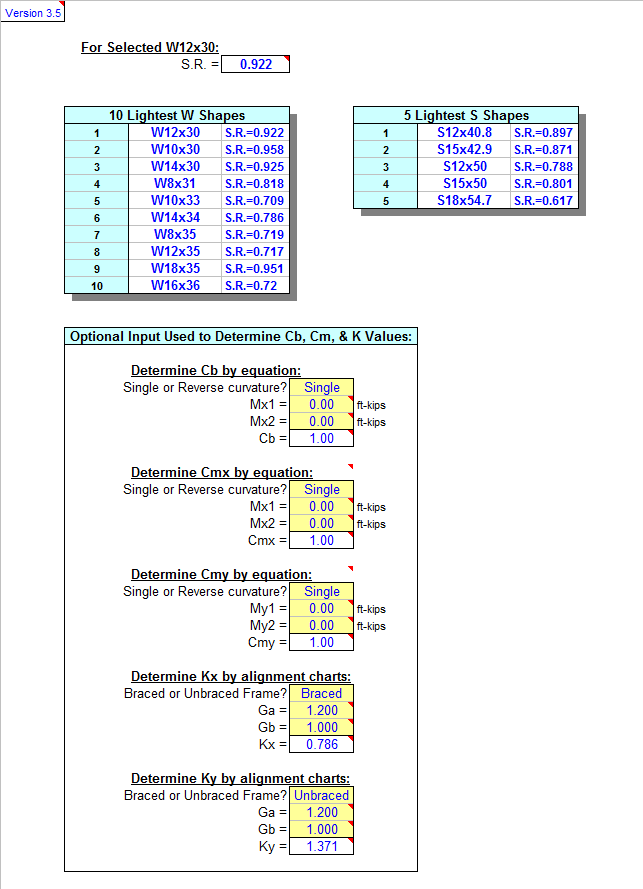
Section properties, actual and allowable axial and bending stresses, Euler stresses, the stress ratio, and the lightest acceptable sections (for example the 10 lightest W shapes).
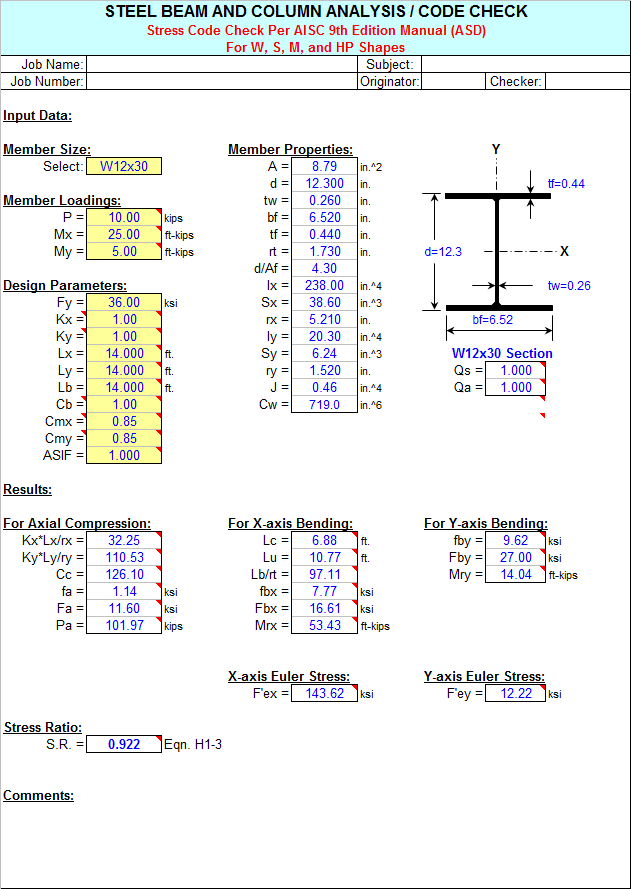
The stored example, a W12x30 (Fy = 36 ksi) 14 ft long carrying 10 kips compression with Mx = 25 ft-kips and My = 5 ft-kips, gives fa = 1.14 ksi against Fa = 11.6 ksi, fbx = 7.77 ksi against Fbx = 16.6 ksi, fby = 9.62 ksi against 27 ksi, and a stress ratio of 0.92.
Please note
- Tees (WT) and angles are not covered. US customary units; AISC 9th Edition ASD and the 2001 shapes database have been superseded. Sheets protected without a password, formulas hidden. No macros.
- Written by Alex Tomanovich, P.E. Reference: AISC Manual of Steel Construction (ASD), 9th Edition, 1989.
Calculation Preview
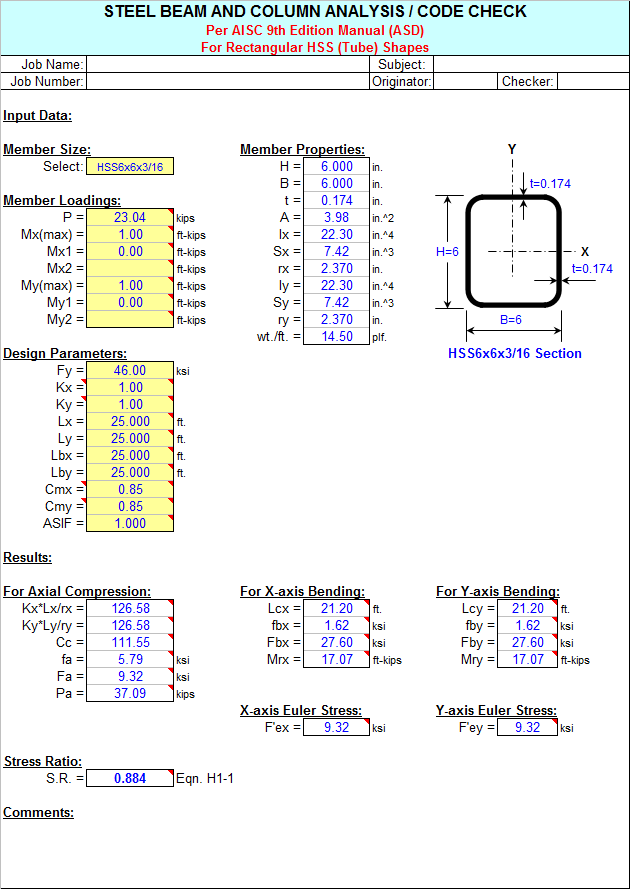
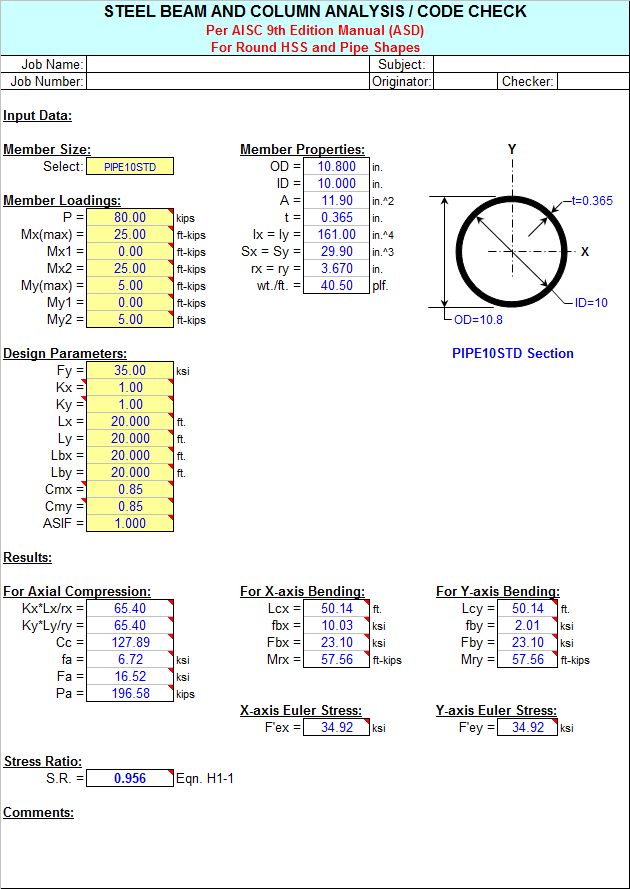 (4/43)
Full download access to any calculation is available to users with a paid or awarded subscription (XLC Pro).
Subscriptions are free to contributors to the site, alternatively they can be purchased.
Click here for information on subscriptions.
Comments: 10
×

1 month ago
I'd also love if you guys could provide it in Metric/Si units.

7 years ago
Super

8 years ago
any chance SI units for this calc

10 years ago
In the "BEAMCOL9.xls" spreadsheet workbook it was discovered that in the "BeamCol(C)" worksheet for analysis of C-shaped members, the program logic was not correctly set up to make use the transition equation (AISC 9th Edition Eqn. F2-2) when applicable for determining the allowable minor axis bending stress (Fby) between a maximum value of 0.75*Fy and a minimum value of 0.6*Fy depending on the bf/tf ratio. The rationale/logic described in the comment box in Cell H33 was correctly depicted, but the programming logic was not correct, which would have produced conservative results by deferring to a value of Fby = 0.60*Fy.
This has been corrected and the version number of this workbook is now 3.6.
I know that we have long moved on from the AISC 9th Manual ("green book") that most of us "old timers" have clung on to tightly for so long. However, I'm aware that because of familiarity many of us still fall back on it for quick cross-checks and preliminary/estimate engineering, and thus I will continue to support it in the form of updates to spreadsheets if/when required.
13 years ago
The 'BEAMCOL9.xls' spreadsheet does not calculate the design loadings, P, Mx, and My, for you. You must predetermine those values.
If a computer model was made of the structure, then the axial force (P) and the moments for the member in question can be taken from the model. However, most computer analysis programs can perform their own stress code checks.
If there is no computer model analysis and if the loads on the member are known, then the moments can be calculated using my 'BEAMANAL.xls' spreadsheet.
I'm not sure how much more I can add to this discussion. My spreadsheets are merely 'tools' to be used wisely by structural engineers.
Alex
13 years ago
mofsubic,
I'm not really clear on exactly what you are asking? It's pretty straight forward. The spreadsheet input requires the pre-determined member loadings as well as unbraced lengths, etc., and then a stress code check is performed, resulting in a stress ratio (S.R.).
The numerous comment boxes will display the AISC 9th Edition Manual equations and rationale that the spreadsheet uses in dealing with axial compression load as well as major and minor axis bending moments.
Alex

16 years ago
You need an XLC Pro subscription to download from the repository. This can paid for or [awarded for free if you donate a calculation to the site](/calcs/good-calc-guide#Publish). It is all explained on the [subscription plans page](/pricing/compare-subscription-plans).
17 years ago
Alex,
Have you by chance been working on an update to your BEAMCOL9 for AISC 13th edition? I ask because I have been slowly updating your spreadsheet to AISC 13th edition as I need it and have time. If you would like, I can upload it to the site when I am complete. I thought it would help you out a little and be something everyone would find useful. However, I wanted to approve it with you first since this is still your original spreadsheet and you might be already working on an update.
By the way, *thank you very much* for all of your work on the many spreadsheets and for generously posting them for all of us to use. I have found them useful on many occasions.
Josh
18 years ago
After all of these years in working on very my first all metric units project (haven't I been fortunate) the past several months, we in the group have been making use of the "BEAMCOL9.xls", "BMREINF9.xls", and BASEPLT9.xls" spreadsheet workbooks. We also have been working with structural steel with a de-rated yield stress value. Thus, I removed the input data validation pick boxes which originally limited the user to specific values of 'Fy', 33 (old steel), 36, and 50 ksi. I also added the "ROUND" command to the sketches which displayed the member dimensions, to truncate the display of the member dimensions (d, tw, bf, and tf) in case they were converted by formula from metric to English. I merely wanted to make these workbooks a bit more "friendly" toward metric units usage.
By the way for us ASD 9th Edition "die-hards", the "BeamCol(Built-Up)" worksheet is a useful tool for doing AISC Code checks using metric shapes, in that all you need to do is enter a formula in the input cells for each of the dimensions (d, tw, bf, and tf) in millimeters divided by 25.4, and the worksheet will automatically calculate all of the properties for you. Keep in mind that the "fillets" of the member are not considered, so the calculated properties will be very close approximations.
By the way for us ASD 9th Edition "die-hards", the "BeamCol(Built-Up)" worksheet is a useful tool for doing AISC Code checks using metric shapes, in that all you need to do is enter a formula in the input cells for each of the dimensions (d, tw, bf, and tf) in millimeters divided by 25.4, and the worksheet will automatically calculate all of the properties for you. Keep in mind that the "fillets" of the member are not considered, so the calculated properties will be very close approximations.
If you convert it, check every constant and table as well as the labels: BEAMCOL9 works to the AISC 9th Edition ASD Manual, which is in US units, so some formulas use US units internally.
If you produce a metric version, you are welcome to upload it with a credit to Alex. A version that follows our Good Calculation Guide (https://www.excelcalcs.com/calcs/good-calc-guide) would earn an XLC Pro subscription.